Posted by R. Jason Sams, Android RenderScript Tech Lead
RenderScript has a very powerful ability called Intrinsics. Intrinsics are built-in functions that perform well-defined operations often seen in image processing. Intrinsics can be very helpful to you because they provide extremely high-performance implementations of standard functions with a minimal amount of code.
RenderScript intrinsics will usually be the fastest possible way for a developer to perform these operations. We�ve worked closely with our partners to ensure that the intrinsics perform as fast as possible on their architectures — often far beyond anything that can be achieved in a general-purpose language.
Table 1. RenderScript intrinsics and the operations they provide.
| Name | Operation |
|---|---|
ScriptIntrinsicConvolve3x3, ScriptIntrinsicConvolve5x5 | Performs a 3x3 or 5x5 convolution. |
ScriptIntrinsicBlur | Performs a Gaussian blur. Supports grayscale and RGBA buffers and is used by the system framework for drop shadows. |
ScriptIntrinsicYuvToRGB | Converts a YUV buffer to RGB. Often used to process camera data. |
ScriptIntrinsicColorMatrix | Applies a 4x4 color matrix to a buffer. |
ScriptIntrinsicBlend | Blends two allocations in a variety of ways. |
ScriptIntrinsicLUT | Applies a per-channel lookup table to a buffer. |
ScriptIntrinsic3DLUT | Applies a color cube with interpolation to a buffer. |
Your application can use one of these intrinsics with very little code. For example, to perform a Gaussian blur, the application can do the following:
RenderScript rs = RenderScript.create(theActivity);
ScriptIntrinsicBlur theIntrinsic = ScriptIntrinsicBlur.create(mRS, Element.U8_4(rs));;
Allocation tmpIn = Allocation.createFromBitmap(rs, inputBitmap);
Allocation tmpOut = Allocation.createFromBitmap(rs, outputBitmap);
theIntrinsic.setRadius(25.f);
theIntrinsic.setInput(tmpIn);
theIntrinsic.forEach(tmpOut);
tmpOut.copyTo(outputBitmap);
This example creates a RenderScript context and a Blur intrinsic. It then uses the intrinsic to perform a Gaussian blur with a 25-pixel radius on the allocation. The default implementation of blur uses carefully hand-tuned assembly code, but on some hardware it will instead use hand-tuned GPU code.
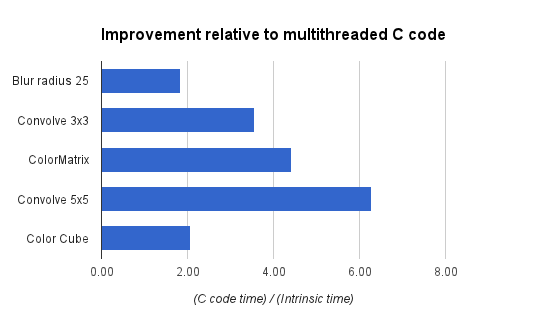
What do developers get from the tuning that we�ve done? On the new Nexus 7, running that same 25-pixel radius Gaussian blur on a 1.6 megapixel image takes about 176ms. A simpler intrinsic like the color matrix operation takes under 4ms. The intrinsics are typically 2-3x faster than a multithreaded C implementation and often 10x+ faster than a Java implementation. Pretty good for eight lines of code.
 style="border:1px solid #ddd;border-radius: 6px;" />
Figure 1. Performance gains with RenderScript intrinsics, relative to equivalent multithreaded C implementations.
Applications that need additional functionality can mix these intrinsics with their own RenderScript kernels. An example of this would be an application that is taking camera preview data, converting it from YUV to RGB, adding a vignette effect, and uploading the final image to a SurfaceView for display.
In this example, we�ve got a stream of data flowing between a source device (the camera) and an output device (the display) with a number of possible processors along the way. Today, these operations can all run on the CPU, but as architectures become more advanced, using other processors becomes possible.
For example, the vignette operation can happen on a compute-capable GPU (like the ARM Mali T604 in the Nexus 10), while the YUV to RGB conversion could happen directly on the camera�s image signal processor (ISP). Using these different processors could significantly improve power consumption and performance. As more these processors become available, future Android updates will enable RenderScript to run on these processors, and applications written for RenderScript today will begin to make use of those processors transparently, without any additional work for developers.
Intrinsics provide developers a powerful tool they can leverage with minimal effort to achieve great performance across a wide variety of hardware. They can be mixed and matched with general purpose developer code allowing great flexibility in application design. So next time you have performance issues with image manipulation, I hope you give them a look to see if they can help.


 style="border:1px solid #ddd;border-radius: 6px;" />